
Deep sky astrophotography: an overview for beginners
A photograph of a nebula might represent weeks of clear nights and a few hours at the computer. Here’s how it all comes together, using photographs taken from my back garden in central Bristol.

How do you take those photos?
It’s the question I’m asked most often by people who haven’t tried astrophotography. The short answer is that I take lots of photographs of the same object in space, combine them using software, and carefully process the result to reveal faint detail.
“Deep sky” means objects beyond our Solar System, such as galaxies, nebulae, and star clusters. Photographing the Moon and planets is a related hobby, but the equipment and techniques can be quite different.
There are three main stages:
- Planning: choose a target, work out when to photograph it, and decide how it will fit in the frame.
- Taking the photos: collect lots of exposures, plus some extra frames that help correct for the camera and optics.
- Processing: combine the useful exposures and bring out the detail and colour in the finished image.
I do all this under Bortle 8 skies, with plenty of city light pollution. Many of the objects in my photographs are far too faint to see with the naked eye from my garden. A camera can collect light over time, though, which opens up a rather different view of the sky.
This is an overview of the whole process, using my telescope setup as an example. You can also begin with a DSLR or mirrorless camera, or let a smart telescope handle much of the routine work.
1. Planning: choosing a patch of sky
First, I need to decide what to photograph. Different objects are well placed at different times of year. I also need a clear view past buildings, trees, and anything else sharing my little patch of Bristol.
If you’d like a shortlist, my beginner targets for every season guide has twelve ideas, with photographs and advice on framing them.
I use The Astrophotography Planner and Stellarium to help. Stellarium can show the sky from my location and draw a rectangle representing the area my telescope and camera will photograph. It’s much easier to try a few compositions on screen than to discover half a nebula is missing after a clear night!
The telescope’s focal length and the camera’s sensor size determine the field of view. My 105 mm Svbony SV535 takes in large areas of sky. My 1000 mm Askar 130PHQ gives a closer view of smaller objects and details within nebulae. Neither view is automatically better. The trick is matching the target to the equipment.


These earlier Stellarium screenshots show how differently sized targets fit within the same camera frame. Change the telescope or camera, and the rectangle changes too.
I aim to photograph targets when they’re reasonably high in the sky. That means looking through less atmosphere, and often avoiding the brightest glow near the horizon. The Moon matters too, especially for galaxies, star clusters, and reflection nebulae.
Filters can help with some targets. A dualband filter such as my Optolong L-Ultimate passes narrow bands of light emitted by hydrogen and oxygen while blocking much of the surrounding sky glow. That makes it useful for emission nebulae. It isn’t a universal light pollution remover, and it would also block much of the light I want from a galaxy.
Finally, I check that the target will remain well placed over several weeks. One clear evening is lovely. Enough clear evenings to finish a project is even better.
2. Taking the photos: collecting light
This stage is often called “data acquisition”, which makes an evening in the garden sound much more official. The aim is simple: collect as much useful light from the target as I can.
Setting up
My mount lives on a permanent pier in the garden, under a cover when it isn’t in use. I bring out the telescope and camera, attach the equipment, and check the cables, balance, and power. The mount also needs to be polar-aligned, so its tracking axis lines up with Earth’s axis of rotation. Having a permanent setup saves time, but I still check the alignment if anything has moved.

The camera sits at the back of the telescope, where an eyepiece might otherwise go. I don’t look through the telescope while it’s imaging. Instead, I see the photographs on my screen.
My ASIAIR Plus controls the camera, mount, guiding, and focusing equipment. I connect to it with an app on my phone. Other setups use a laptop, while smart telescopes put much of this technology into one compact unit.

I also switch on the camera’s cooling system. A thermoelectric cooler lowers the sensor temperature, while a fan helps carry the heat away. Cooling reduces the unwanted signal produced by the sensor itself, and keeping the temperature steady helps with calibration. I often use -10°C, provided the camera can comfortably maintain it.

Finding, framing, and focusing
I tell the ASIAIR which object I want to photograph. It moves the mount towards the target, takes a test image, and compares the stars with a catalogue to work out exactly where the telescope is pointing. This is called plate solving. The system can then correct the pointing and put the target where I want it.
I check the composition and, if necessary, rotate the camera. An autofocus routine adjusts the telescope’s focus until the stars are as small and sharp as possible. Focus can drift as the temperature changes, so it needs checking during the night as well.
Keeping the stars still
On a sunny day, a normal camera might take a photograph in 1/500th of a second. A faint nebula needs rather more patience. I often use five-minute exposures with my dualband filters, although shorter exposures can be more suitable for other targets, filters, and equipment.
During those minutes, Earth keeps turning. An equatorial mount tracks the sky to prevent the stars becoming streaks. Guiding adds another layer of accuracy: a small camera watches the stars and sends corrections to the mount when the tracking drifts.
My current 130PHQ setup uses an Askar M54 off-axis guider and ZWO ASI220MM Mini. The guider takes a little light from the main telescope for the guide camera. My widefield setup uses a separate small guidescope instead. Both arrangements are doing the same basic job.

One exposure is only the beginning
Each individual photograph is called a sub-exposure, or “sub”. Once the setup is running, the controller can keep taking them, with small shifts called dithers between some exposures to help reduce repeating sensor patterns in the final stack.

The important number is the total integration time: the exposure times of all the useful subs added together. For example, 240 five-minute exposures give 20 hours of integration.
Light pollution adds a bright background and extra noise, making faint detail harder to separate from the sky. Collecting more total exposure time helps improve that separation. This is why I often return to the same target over many nights, sometimes gathering 20 to 30 hours or more. The faintest projects can take considerably longer.
That isn’t a minimum entry requirement! You can make a satisfying first image with much less time, then add more data as you learn. The right goal depends on the target, equipment, sky, and the result you’re after.
Automation is particularly handy here. An ASIAIR or other controller makes it practical to repeat an imaging sequence and return to the same framing on another night. My How to Get Long Integration Times article explains how I make the most of those clear spells between Bristol’s clouds.
A little housekeeping: calibration frames
I also take calibration frames, which help the software correct for the camera and optics. Flats are photographs of an evenly illuminated surface. They reveal uneven illumination, including dark corners called vignetting, and shadows from dust near the sensor.

I use a light panel in front of the telescope to take flats. They need to match the imaging setup, including the filter, camera orientation, and dust pattern. I take new ones if those conditions change, rather than assuming one set will suit the whole project.
Other calibration frames, such as darks and bias frames or dark flats, deal with different camera signals. You don’t need to memorise the details here. The useful idea is that calibration helps separate quirks of the equipment from what is actually in the sky.
3. Processing: turning the exposures into a photograph
Back at the computer, I have a folder full of subs. The finished image starts with choosing which ones to use. Frames spoiled by cloud, poor focus, or serious tracking problems can stay out of the stack. There’s no fixed percentage to throw away. I want to keep useful data, not reject it for the sake of it.
Calibrate, align, and stack
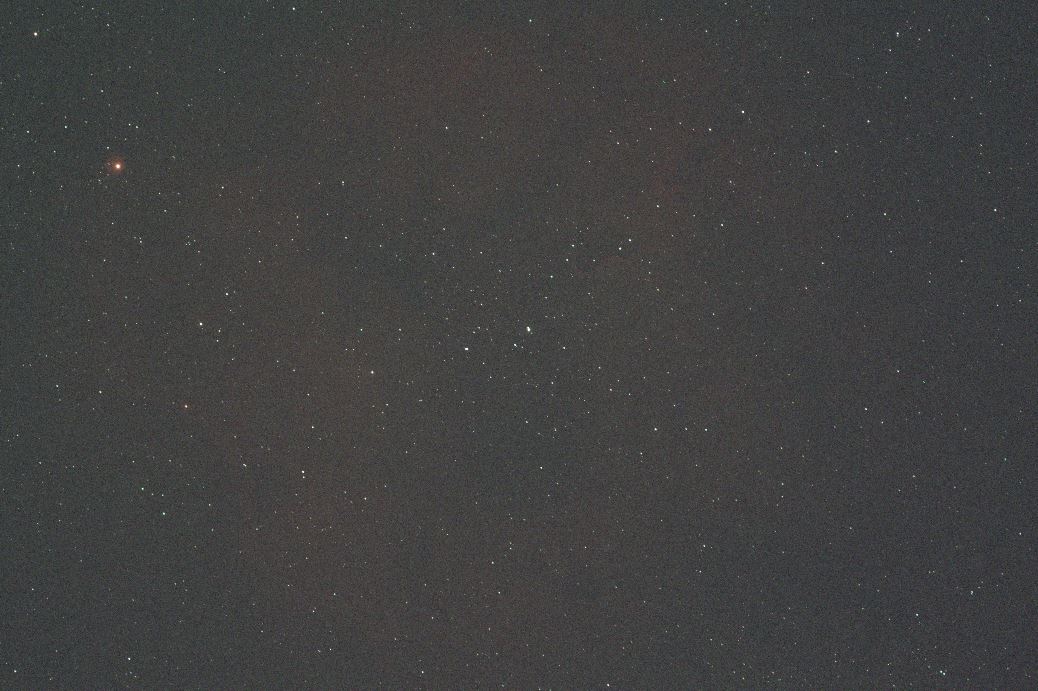
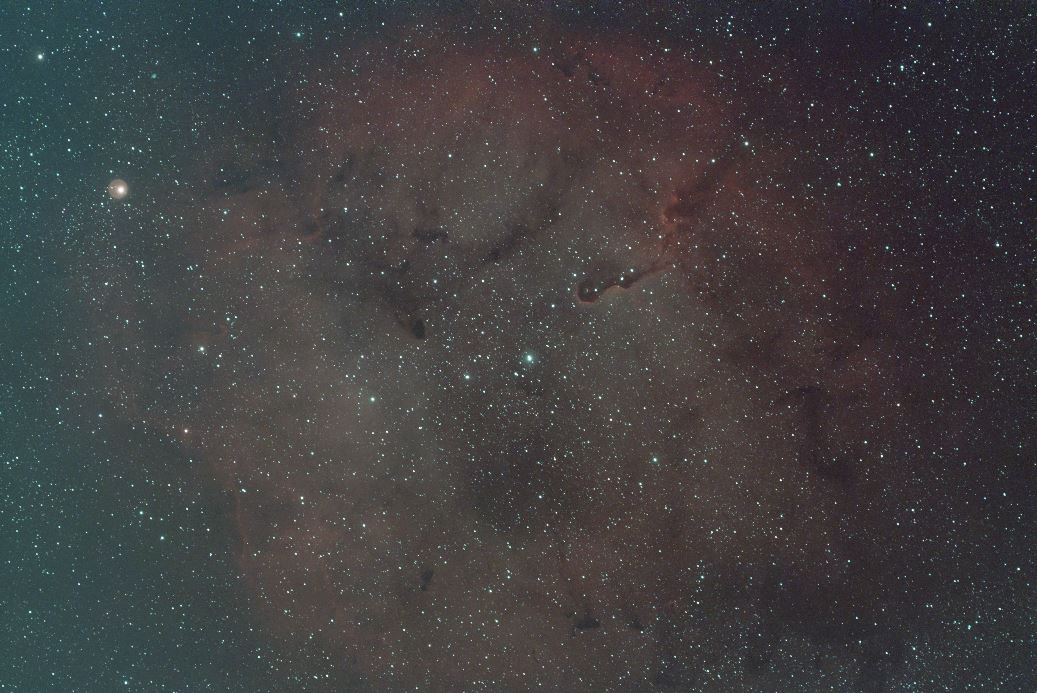
The software uses the calibration frames to correct the exposures. Flats, for example, correct for uneven illumination and dust shadows. It then aligns the stars and combines the useful frames into one image. This is called stacking, or integration.
Stacking makes the real signal easier to distinguish from random noise. Suitable rejection settings can also discard things that appear in only a few frames, such as satellite trails. It doesn’t simply average away light pollution. The sky background still needs attention, and its extra noise is one reason city imaging benefits from so much total exposure time.


Bringing out the detail
The stack may still look very dark when first opened. A process called stretching makes faint features visible while keeping bright areas under control. I also work on the sky background, colour, contrast, and remaining noise.
The aim is to show the information the camera recorded clearly. Colour choices depend on the data: a broadband image can retain familiar star colours, while narrowband images can assign the light from different gases to different colours. Those choices are part of explaining what the image shows.

I usually spend a few hours processing an image, and there’s often more than one good way to approach it. I keep the original data too. As my skills improve, I can revisit an older project and see what else is hiding in it.

For the next step, Process your first astrophotos brings together my PixInsight review, pre-processing guide, and target pages with processing videos.
Ready to have a go?
You don’t need to build a setup like mine to get started. Choose the route that suits your equipment, budget, and curiosity, and let the first few sessions be about learning and enjoying the sky.

Take your first astrophoto
Take your first photograph of the stars with a DSLR or mirrorless camera, a lens, and a tripod. Learn exposure, focus, and how to spot common mistakes.
Read the guide →
Get started with a smart telescope
Start photographing galaxies, nebulae, and star clusters with a smart telescope. Learn from my Seestar S50 sessions and realistic results under Bristol city skies.
Read the guide →
Build your first widefield rig
Build a first widefield astrophotography setup using the Svbony SV535 and Askar FRA400 as examples. Understand the mount, camera, filters, and first imaging session.
Read the guide →
Process your first astrophotos
Find a starting point for processing your images, with my PixInsight review, pre-processing guide, and target-by-target video walkthroughs.
Read the guide →If you already have a dependable rig and fancy a closer view, try Getting started with longer focal lengths.
The equipment behind my photos
Here’s the main kit mentioned in this overview, with links to my reviews and retailers. This is the setup I’ve built up over time. The practical guides above cover simpler starting points, and my full equipment page has the rest of the details.
These are affiliate links, which help support the site at no extra cost to you.

Askar 130PHQ
My longer focal length telescope for closer views of galaxies, star clusters, and nebulae.

ZWO ASI2600MC Pro
The cooled one shot colour camera I use with my telescopes.

StellarDrive X 6R PRO
My Sky-Watcher EQ6-R Pro, rebuilt by DarkFrame Optics. The retailer links below are for the standard EQ6-R Pro.

Askar M54 off-axis guider
Takes guide light through the main telescope, so the guide camera can monitor tracking.

ZWO ASI220MM Mini
The guide camera on my current 130PHQ setup.

ZWO ASIAIR Plus
Runs the camera, mount, guiding, and focusing routines from an app on my phone.

Optolong L-Quad Enhance
A broadband filter I use for star colour and suitable broadband targets.

Optolong L-Ultimate
Passes narrow bands of hydrogen-alpha and oxygen-III light for emission nebulae.

Askar E2
Passes sulphur-II and oxygen-III light, adding another view of emission nebulae.
Discover more from Urban Astrophotography
Subscribe to get the latest posts sent to your email.
I’m getting around to reading every article you’ve written….Fortunate I read about your site via ZWO on Facebook
Very well done…look forward to future ASI Air Plus articles as well.
Thanks Mike, I’m glad you’re finding the website useful! I generally add new content every month so it’s worth checking back every now and then.